
Saturday, April 25, 2009


Home Networking Made Easy


Check it out today!
___________________________________________________________


Friday, April 24, 2009
Please Visit Our Current Items on Sale at Computer Gal's LLC
Please visit our shop for your current computing and software needs!
Click here to visit our current catalog with convenient check out. Don't forget to visit our home page at www.computer-gal.com and click on online shop to begin shopping. You can also visit our current ebay items at our online store here. We also offer even more convenience by offering top of the line items with http://www.icintracom.com/. Just email us for a quote, most of their items have a lifetime warranty and we are able to offer you below retail pricing!
Until later
Computer Gal
Click here to visit our current catalog with convenient check out. Don't forget to visit our home page at www.computer-gal.com and click on online shop to begin shopping. You can also visit our current ebay items at our online store here. We also offer even more convenience by offering top of the line items with http://www.icintracom.com/. Just email us for a quote, most of their items have a lifetime warranty and we are able to offer you below retail pricing!
Until later
Computer Gal
Monday, March 16, 2009
IBM ThinkPad T41 Bargain! $379.00 Hurry ends Soon

IBM ThinkPad T41
- Intel Pentium M 1.6Ghz
- 1GB Ram
- 80GB Hard Drive
- CDRW and DVD
- WiFi 802.11 B/G
- Ethernet 10/100/1000
- BlueTooth
- Windows XP Pro
- 14.1" Display
- ATI Radeon 7500 Video
- 6 cell Li-Ion Battery
- Full-duplex, stereo sound
- 6 Months Warranty
If you have any questions in regards to payment, shipping or anything else,
please contact us by email support@computer-gal.com
More Sales and Discounts for Computer Gal's Customers


__________________________________________________________________________________

_________________________________________________________________________________

___________________________________________________________________________________

___________________________________________________________________________________


30% Off and Free Shipping on Select InformIT Products

InformIT (Pearson Education)
Has a pretty good sale going on right now with free shipping and 30% off select merchandise. Check it out!
Computer Gal
Monday, March 9, 2009
Ten million PCs may be infected with sneaky programs
Panda: ID Theft Trojans Are on 1 in 100 PCs We Scan
According to an article I read on PC World web site and I have quoted below for you, we have some major problems going on. The part that worries me, which I have highlighted for you below is that 35% of the infected computers were running up to date protection!"The company found that just over one percent of the 67 million people who tried out its free ActiveScan test site last year were infected with malicious software designed to help thieves steal sensitive information about victims. If one percent of the world's 1 billion computers are infected, that would mean that this kind of software is on 10 million PCs worldwide, the company reports.
These identity-theft-focused Trojan programs are becoming more sophisticated, and more common. Panda's detection rate jumped 800 percent between the middle of 2008 and the end of the year, according to Carlos Zevallos, a security evangelist with the security company. "The report shows a very sobering number," he said. "We don't want it to seem that it is a hopeless battle [but] all businesses innovate, and crimeware is a business."
Identity theft is a big problem. The U.S. Federal Trade Commission estimates that 9 million U.S. residents have their identities stolen each year through a variety of techniques, including dumpster diving, skimming credit card numbers at legitimate businesses and phishing.
According to Panda, these Trojan programs are a now a serious threat too. Victims of the Trojans are usually tricked into installing the software themselves. They may think they're installing a new plugin in order to view a video. Once the software is installed, it typically sends messages to a central, command and control server
Although banking Web sites have added a lot of features over the years to prevent hackers in another country such as Russia from logging into online accounts, these banking Trojans can be really hard to stop, Zevallos said. "They essentially have complete control of your machine, so they can send a request from your machine and the Web site will not know that it is not being initiated by the user."
Trojans can take screen shots of everything on your screen and search the machine for credit-card numbers, Social Security numbers, resumes -- anything that could be used in identity theft. Today's Trojans can even download software updates from their criminal masters.
Today's most common financial Trojans go by names like Cimuz, Sinowal and Torpig.
Most of these programs come from China or Russia, but Panda says that a growing number are coming from Brazil and Korea too.
In the past few years, hackers have become very good at cranking out new, slightly altered, variants of their malware, designed to evade antivirus detection. So antivirus products will detect identity theft Trojans, but not all of them. Panda said that 35 percent of the infected PCs that it spotted last year were already using up-to-date antivirus programs."
Not good news folks, here is the link for the article
Monday, March 2, 2009
Need some xtra cash!
There are more people than you can imagine that live off of "link referral" commission checks. A lot of people create web sites that really serve no purpose except to offer you links to other web sites.
If you do have a web site or a blog, it might be worth your wild to sign up with a couple of the major players in the industry and add links to some companies that you like or enjoy their products. Link referral is one such company that organizes your accounts and commissions. You can find out more here

If you do have a web site or a blog, it might be worth your wild to sign up with a couple of the major players in the industry and add links to some companies that you like or enjoy their products. Link referral is one such company that organizes your accounts and commissions. You can find out more here
Sunday, February 22, 2009
Microsoft Offers $250K Reward to Catch Worm Conficker Author
Do you know the conflicker worm creator? If so, you could earn $250k if you turn them over to Microsoft.
According to an article at Inside tech and I quote
http://www.insidetech.com/news/articles/3997-microsoft-offers-250k-reward-to-catch-worm-authors
"The Conficker worm multiplied like wildfire, and spreads through a hole found in Microsoft Windows systems, though the vulnerability was patched in October. It also is able to disable anti-malware protection and will block an infected PC from visiting anti-malware vendors Web sites to receive updates.
Security experts are even more worried about the possibility the worm calls home every 24 hours to at least 250 servers each day for instructions or directed actions."
Hosuton's police department apparently was infected and forced to stop arresting people with traffic warrants because the worm spread its way through the police and city court's computer systems.
Now that is bad news folks. Click on the link above for more information on the conflicker worm.
Computer Gal
According to an article at Inside tech and I quote
http://www.insidetech.com/news/articles/3997-microsoft-offers-250k-reward-to-catch-worm-authors
"The Conficker worm multiplied like wildfire, and spreads through a hole found in Microsoft Windows systems, though the vulnerability was patched in October. It also is able to disable anti-malware protection and will block an infected PC from visiting anti-malware vendors Web sites to receive updates.
Security experts are even more worried about the possibility the worm calls home every 24 hours to at least 250 servers each day for instructions or directed actions."
Hosuton's police department apparently was infected and forced to stop arresting people with traffic warrants because the worm spread its way through the police and city court's computer systems.
Now that is bad news folks. Click on the link above for more information on the conflicker worm.
Computer Gal
Tuesday, February 3, 2009
Please sign up for our FREE Newsletter
We are currently sending out two newsletters per month. One is with one of our new electronic/computing items at discount pricing. This week for instance we had 4gig flash drives for $4.00. We will aslo send out a one page monthly newsletter with computing tips and tricks, highlighting our blog, our stores and links to technology tips, tricks, freebies and bargains, many that are not published here due to time restrictions. If any any time you would no longer wish to receive the newsletter just send us a email with remove from weekly promotion newsletter in suject line to sherry@computer-gal.com or support@computer-gal.com and you will be removed. Try it out, as we are partners with so many vendors and we can't keep all the promotions posted, so the newsletter seemed to be the best solution.
If the box does not appear to the right, just email either of the above email address with signup for newsletter in the subject line......
Thanks Again
Computer Gal
If the box does not appear to the right, just email either of the above email address with signup for newsletter in the subject line......
Thanks Again
Computer Gal
Saturday, January 24, 2009
Free Expensive Microsoft Software for Students
If you are a student, you need to take advantage of this!
Free EXPENSIVE software available for download via Microsoft's dreamspark.
https://www.dreamspark.com/
"DreamSpark is simple, it's all about giving students Microsoft professional-level developer and design tools at no charge so you can chase your dreams and create the next big breakthrough in technology - or just get a head start on your career. "
No excuses now! Go for it!
Computer Gal
Free EXPENSIVE software available for download via Microsoft's dreamspark.
https://www.dreamspark.com/
"DreamSpark is simple, it's all about giving students Microsoft professional-level developer and design tools at no charge so you can chase your dreams and create the next big breakthrough in technology - or just get a head start on your career. "
No excuses now! Go for it!
Computer Gal
Friday, January 23, 2009
List of week passwords used by hackers the most
If you are using a password listed below, change it immediately, as it is listed on the most commonly used by hacker password list.
Computer Gal
123
1234
12345
123456
1234567
12345678
123456789
1234567890
123123
12321
123321
123abc
123qwe
123asd
1234abcd
1234qwer
1q2w3e
a1b2c3
admin
Admin
administrator
nimda
qwewq
qweewq
qwerty
qweasd
asdsa
asddsa
asdzxc
asdfgh
qweasdzxc
q1w2e3
qazwsx
qazwsxedc
zxcxz
zxccxz
zxcvb
zxcvbn
passwd
password
Password
login
Login
pass
mypass
mypassword
adminadmin
root
rootroot
test
testtest
temp
temptemp
foofoo
foobar
default
password1
password12
password123
admin1
admin12
admin123
pass1
pass12
pass123
root123
pw123
abc123
qwe123
test123
temp123
mypc123
home123
work123
boss123
love123
sample
example
internet
Internet
nopass
nopassword
nothing
ihavenopass
temporary
manager
business
oracle
lotus
database
backup
owner
computer
server
secret
super
share
superuser
supervisor
office
shadow
system
public
secure
security
desktop
changeme
codename
codeword
nobody
cluster
customer
exchange
explorer
campus
money
access
domain
letmein
letitbe
anything
unknown
monitor
windows
files
academia
account
student
freedom
forever
cookie
coffee
market
private
games
killer
controller
intranet
work
home
job
foo
web
file
sql
aaa
aaaa
aaaaa
qqq
qqqq
qqqqq
xxx
xxxx
xxxxx
zzz
zzzz
zzzzz
fuck
12
21
321
4321
54321
654321
7654321
87654321
987654321
0987654321
0
00
000
0000
00000
00000
0000000
00000000
1
11
111
1111
11111
111111
1111111
11111111
2
22
222
2222
22222
222222
2222222
22222222
3
33
333
3333
33333
333333
3333333
33333333
4
44
444
4444
44444
444444
4444444
44444444
5
55
555
5555
55555
555555
5555555
55555555
6
66
666
6666
66666
666666
6666666
66666666
7
77
777
7777
77777
777777
7777777
77777777
8
88
888
8888
88888
888888
8888888
88888888
9
99
999
9999
99999
999999
9999999
99999999
1234
12345
123456
1234567
12345678
123456789
1234567890
123123
12321
123321
123abc
123qwe
123asd
1234abcd
1234qwer
1q2w3e
a1b2c3
admin
Admin
administrator
nimda
qwewq
qweewq
qwerty
qweasd
asdsa
asddsa
asdzxc
asdfgh
qweasdzxc
q1w2e3
qazwsx
qazwsxedc
zxcxz
zxccxz
zxcvb
zxcvbn
passwd
password
Password
login
Login
pass
mypass
mypassword
adminadmin
root
rootroot
test
testtest
temp
temptemp
foofoo
foobar
default
password1
password12
password123
admin1
admin12
admin123
pass1
pass12
pass123
root123
pw123
abc123
qwe123
test123
temp123
mypc123
home123
work123
boss123
love123
sample
example
internet
Internet
nopass
nopassword
nothing
ihavenopass
temporary
manager
business
oracle
lotus
database
backup
owner
computer
server
secret
super
share
superuser
supervisor
office
shadow
system
public
secure
security
desktop
changeme
codename
codeword
nobody
cluster
customer
exchange
explorer
campus
money
access
domain
letmein
letitbe
anything
unknown
monitor
windows
files
academia
account
student
freedom
forever
cookie
coffee
market
private
games
killer
controller
intranet
work
home
job
foo
web
file
sql
aaa
aaaa
aaaaa
qqq
qqqq
qqqqq
xxx
xxxx
xxxxx
zzz
zzzz
zzzzz
fuck
12
21
321
4321
54321
654321
7654321
87654321
987654321
0987654321
0
00
000
0000
00000
00000
0000000
00000000
1
11
111
1111
11111
111111
1111111
11111111
2
22
222
2222
22222
222222
2222222
22222222
3
33
333
3333
33333
333333
3333333
33333333
4
44
444
4444
44444
444444
4444444
44444444
5
55
555
5555
55555
555555
5555555
55555555
6
66
666
6666
66666
666666
6666666
66666666
7
77
777
7777
77777
777777
7777777
77777777
8
88
888
8888
88888
888888
8888888
88888888
9
99
999
9999
99999
999999
9999999
99999999
Computer Gal
More on the Worm:Win32/Conficker.B
Which is also known as:
TA08-297A (other)
CVE-2008-4250 (other)
VU827267 (other)
Win32/Conficker.A (CA)
Mal/Conficker-A (Sophos)
Trojan.Win32.Agent.bccs (Kaspersky)
W32.Downadup.B (Symantec)
Confickr (other)
Each security service provider seems to have a different code name, which in my opinion is ridiculous. It seems they should all agree on one name, to at least make it easy on the consumer/tech on finding removal tools or overall general information.
The worm exploits a vulnerability in the Windows Server service (SVCHOST.EXE). If the vulnerability is successfully exploited, it could allow remote code execution when file sharing is enabled. It may also spread via removable drives and weak administrator passwords. It disables several important system services and security products. Here is the hints that you may be infected.
Each security service provider seems to have a different code name, which in my opinion is ridiculous. It seems they should all agree on one name, to at least make it easy on the consumer/tech on finding removal tools or overall general information.
The worm exploits a vulnerability in the Windows Server service (SVCHOST.EXE). If the vulnerability is successfully exploited, it could allow remote code execution when file sharing is enabled. It may also spread via removable drives and weak administrator passwords. It disables several important system services and security products. Here is the hints that you may be infected.
The following system changes may indicate the presence of this malware:
- The following services are disabled or fail to run:
Windows Update Service
Background Intelligent Transfer Service
Windows Defender
Windows Error Reporting Services
Background Intelligent Transfer Service
Windows Defender
Windows Error Reporting Services
- Some accounts may be locked out due to the following registry modification, which may flood the network with connections:
HKLM\SYSTEM\CurrentControlSet\Services\Tcpip\Parameters
"TcpNumConnections" = "0x00FFFFFE"
"TcpNumConnections" = "0x00FFFFFE"
- Users may not be able to connect to websites or online services that contain the following strings:
virus
spyware
malware
rootkit
defender
microsoft
symantec
norton
mcafee
trendmicro
sophos
panda
etrust
networkassociates
computerassociates
f-secure
kaspersky
jotti
f-prot
nod32
eset
grisoft
drweb
centralcommand
ahnlab
esafe
avast
avira
quickheal
comodo
clamav
ewido
fortinet
gdata
hacksoft
hauri
ikarus
k7computing
norman
pctools
prevx
rising
securecomputing
sunbelt
emsisoft
arcabit
cpsecure
spamhaus
castlecops
threatexpert
wilderssecurity
windowsupdate
Up next a list of the most commonly used passwords that hackers look for to break into your network.
Computer Gal
spyware
malware
rootkit
defender
microsoft
symantec
norton
mcafee
trendmicro
sophos
panda
etrust
networkassociates
computerassociates
f-secure
kaspersky
jotti
f-prot
nod32
eset
grisoft
drweb
centralcommand
ahnlab
esafe
avast
avira
quickheal
comodo
clamav
ewido
fortinet
gdata
hacksoft
hauri
ikarus
k7computing
norman
pctools
prevx
rising
securecomputing
sunbelt
emsisoft
arcabit
cpsecure
spamhaus
castlecops
threatexpert
wilderssecurity
windowsupdate
Up next a list of the most commonly used passwords that hackers look for to break into your network.
Computer Gal
Confickr/Downadup Worm Spreading Fast & Hard to kill
The Confickr/Downadup Worm is spreading fast and is hard to kill according to Information Week Dark Reading recent articles. The conficker worm, which originated in China, has now extended across 83 countries, and is particularly virulent in the United States, Spain, Taiwan, Brazil and Mexico. In the U.S. alone, PandaLabs has identified at least 18,000 infected computers, although the real figure is probably much much higher. This worm is working like the blaster worm which was devistating to many networks a few years back. A good example of how fast this worm is moving is out of 2 million analyzed, 118,000 were infected. Apparently there was a patch for the worm in October, and any computer that did not download Microsoft's patch is vulnerable. The worm then shuts down the computers ability to download the patch or update their antivirus software. The worm also favors mp3 players and usb drives by running a program that asks the consumer if they want to open the device to view the files, once clicked yes to view the contents it infects the computer. Read more at the Panda blog entry for this worm here http://research.pandasecurity.com/archive/Warning_3A00_-Conficker-worm-infections-gaining-traction.aspx?sitepanda=empresas
Download's Microsoft patch here http://www.microsoft.com/technet/security/Bulletin/MS08-067.mspx
Disinfect affected machines using Malware Radar for corporate networks, or ActiveScan for personal computers. - Disable AutoRun for USB devices - Make sure that all antivirus and security solutions are updated to their latest product version and signature file version.
Double check that your antivirus software is updating, run full scans, visit our web site onine resource page for free online scans, and also add Panda's free scan to the list as well which requires a quick registration found here
http://www.pandasecurity.com/activescan/index/?track=1&Lang=en-US&IdPais=63
As always I will keep you posted on any new news!
Computer Gal
Download's Microsoft patch here http://www.microsoft.com/technet/security/Bulletin/MS08-067.mspx
Disinfect affected machines using Malware Radar for corporate networks, or ActiveScan for personal computers. - Disable AutoRun for USB devices - Make sure that all antivirus and security solutions are updated to their latest product version and signature file version.
Double check that your antivirus software is updating, run full scans, visit our web site onine resource page for free online scans, and also add Panda's free scan to the list as well which requires a quick registration found here
http://www.pandasecurity.com/activescan/index/?track=1&Lang=en-US&IdPais=63
As always I will keep you posted on any new news!
Computer Gal
Microsoft Search Server Express is FREE! Download Today
Microsoft is offering their search server express for free!
http://www.microsoft.com/enterprisesearch/flash/searchserverexpress.html
Download here
http://www.microsoft.com/enterprisesearch/serverproducts/searchserverexpress/try-1.aspx
Search file shares, SharePoint sites, Exchange Public Folders, Lotus Notes repositories, and more!
Go from downloading to searching in minutes!
Easy to configure. Easy to maintain. No time waste
http://www.microsoft.com/enterprisesearch/flash/searchserverexpress.html
Download here
http://www.microsoft.com/enterprisesearch/serverproducts/searchserverexpress/try-1.aspx
Sunday, January 18, 2009
How to set up dual booting with Windows 7


Remember to download your free copy of Windows 7, while they last Microsoft is only allowing so many customers (2.5 million) before shutting down the beta try out.
The link for the free download listed in my previous post is http://www.microsoft.com/windows/windows-7/
I found another site that explains how to setupa dual boot computer, so you can boot to your current OS and add 7 as a second option.
Covers everything step by step.
In my last post I forgot to add some screenshots of Windows 7, so here they are
Until Later
Computer Gal
Download your free copy of Windows 7 Beta today
Microsoft has been working on a Vista replacement OS and it is now available for download. Microsoft states
"Windows 7
Over the past few years, you've asked us to make some changes to Windows. We listened closely. Now it's time to share an early look at how we've used your feedback. Windows 7 is faster, more reliable, and makes it easier to do what you want. Both the everyday things and the killer "is that really possible?" things. Dig into this site to see what's coming"
"Windows 7 was built around your feedback, so you'll see a lot of things you've asked for. You asked us to make everyday tasks faster and easier, make your PC work the way you want it to, and make new things possible. And that's exactly what we're doing. Click below to see how it's coming to life!
Here's a first look at what's coming in Windows 7. It's early, so be sure to watch for more details as we get closer to launch. Thanks again for taking the time to help make this a great product.
Improved taskbar and full-screen previews
The taskbar at the bottom of your screen is what you use to switch between the applications you've got open. In Windows 7 you can set the order in which the icons appear and they'll stay put. They're easier to see, too. Click once on the new large icons or bigger preview thumbnails and you're ready to go. You can even see a full screen preview before switching to the window."
Minimum recommended specs call for:
1 GHz 32-bit or 64-bit processor
1 GB of system memory
16 GB of available disk space
Support for DirectX 9 graphics with 128 MB memory (to enable the Aero theme)
DVD-R/W Drive
Internet access (to download the Beta and get updates)
And yes, like anything tech-related, these specs could change.
Some product features of Windows 7, such as the ability to watch and record live TV or navigation through the use of "touch," may require advanced or additional hardware.
You'll need a system recovery disk (and know how to use it).
You're [almost] flying solo: you'll need to troubleshoot problems yourself and call on other Beta testers for their know-how.
It's a two-way thing—Beta testing is about feedback so our developers can fix bugs and hear what appeals to the people who use our products daily. Please tell us what you think.
Watch the calendar. The Beta expires on August 1, 2009. To continue using your PC, please be prepared to reinstall a prior version of Windows or a subsequent release of Windows 7 before the expiration date.
Download url
http://www.microsoft.com/windows/windows-7/default.aspx
Installation instructions
copied from the following web site
http://www.microsoft.com/windows/windows-7/beta-installation-instructions.aspx?pf=true
Beta download: Installation instructions
§ Beta download
§ Installation instructions
§ How to backup a PC
§ FAQ
Information for
§IT Pros
§Developers
§Enterprise
§Small business
§Press
Installing the Windows 7 Beta
What you need to know before installing the Beta
Thank you for participating in the Windows 7 Beta program. To help make sure you have a great experience, please read this section before you install the software—even if you've previously been a beta tester.
§ The Windows 7 Beta is a pre-release version of Windows. While we consider this a stable and high-quality beta, it's not the finished product. It could crash your computer or cause you to lose important files or information.
§ The Beta will stop working on August 1, 2009. To continue using your PC, please be prepared to reinstall a prior version of Windows or a subsequent release of Windows 7 before the expiration date. You won't be able to upgrade from the Beta to the final retail version of Windows 7.
§ Important Note to Internet Explorer 8 Beta testers: If you're already testing Internet Explorer 8, please be aware that the version in the Windows 7 Beta is at a different stage of release. If you're beta-testing Windows 7, you need to use the version of Internet Explorer 8 that comes with it.
To learn more, see Windows 7 Beta: Frequently Asked Questions.
Please do...
§ Do install the Beta only on a dedicated test computer.
§ Do make frequent backups while testing the Beta. You can back up files to an external hard disk, a DVD or CD, or a network folder. (See How to backup a PC.)
§ Do prepare a recovery disc. A recovery disc restores your computer to its out-of-the-box state. Most computers come with one. If yours didn't, contact your PC maker.
§ Do update your antivirus program, run it, and then disable it before installing the Beta. After you install the Beta, remember to re-enable the antivirus program.
§ Do connect to the Internet after you install the Beta. Being connected helps make sure you get useful security and hardware updates. (If you don't have an Internet connection, you can still install the Beta.)
§ Do download the Release Notes. Release Notes provide important information that you should know before installing and using Windows 7. You should familiarize yourself with all of the known issues in this document prior to installing the software. For example, the Release Notes describe a bug in which MP3 files may become corrupted and provide information on mitigating risk.
Please don't...
§ Don't install the Beta if you're uncomfortable troubleshooting your own PC problems. Microsoft does not provide technical support for the Windows 7 Beta.
§ Don't install the Beta on your primary home or work computer. Microsoft is not responsible for downtime stemming from the Windows 7 Beta.
Getting ready to install the Beta
What you'll need
§ A blank DVD
§ A PC with a DVD burner
§ A test PC for the Windows 7 Beta that meets these minimum hardware recommendations (specific to the Beta and subject to change in the final version of Windows 7). Please do not use a PC you rely on for your work or daily use:
o 1 GHz 32-bit or 64-bit processor
o 1 GB of system memory
o 16 GB of available disk space
o Support for DirectX 9 graphics with 128 MB memory (in order to enable Aero theme)
o DVD-R/W Drive
o Internet access (to download the Beta and get updates)
Please note: Some product features of Windows 7, such as the ability to watch and record live TV or navigate through the use of "touch," might require advanced or additional hardware.
Important recommendation
As you know, the point of beta testing is to find things we need to fix. As you help us uncover issues, we'll post fixes on Windows Update. So we recommend you keep your PC set to automatically check for updates through Windows Update. Please also stay current with the Release Notes, which are regularly updated with new notices and information.
To kick-off this process, before installing the Beta, please read the Release Notes. In particular, review the MP3 files and Windows Media Center notes and install the related updates before using the Beta.
So, to keep your PC running the Windows 7 Beta up-to-date, please:
§ Make sure you are connected to the Internet and select the option to "Go online to get the latest updates for installation" when you install the Windows 7 Beta.
§ Set Windows Update to install updates automatically.
§ Check the Release Notes before you install the Beta, and regularly from then on. In particular, please review the MP3 files and Media Center notes and install the related updates before using the Beta.
How to install the Windows 7 Beta
Step 1: Download the Windows 7 Beta
Expand all
How to download the Windows 7 Beta
1. Visit the Windows 7 Beta download page.
2. Choose your language.
3. Choose a 32-bit or 64-bit version of the Beta. To see if your computer can run a 64-bit version of Windows, in Performance Information and Tools (Start>Control Panel>Performance Information and Tools) click View and print details and then look under 64-bit capable. For more information that might help with your decision, see 32-bit and 64-bit Windows: Frequently Asked Questions.
4. Get a Windows 7 Beta product key. (You'll need it later for installation.)
5. Download the Windows 7 Beta.
faqCount = 1;
expandText = "Expand all";
collapseText = "Collapse all";
Step 2: Create an installation DVD
Expand all
How to create an installation DVD
The Windows 7 Beta download is an ISO file, which you'll need to burn onto a blank disc before you can install it. To do that, you'll need to use software designed for burning ISO files.
In addition to commercial ISO burning software, there are free programs such as ISOBuster and Active ISO Burner. To find one, go to a site such as Download.com or Tucows and search for "ISO," "DVD," and "burn".
Follow the instructions that came with your program to create a Windows 7 Beta installation disc.
faqCount = 1;
expandText = "Expand all";
collapseText = "Collapse all";
Step 3: Install the Windows 7 Beta
Expand all
Determine whether to do a custom (clean) installation or an upgrade installation
Now you must make an important decision: whether to perform a custom (clean) installation or an upgrade installation.
Custom (clean) installation:
§ Your computer has no operating system installed, or it's running a version of Windows prior to Windows Vista with Service Pack 1 (including Windows XP).
§ You do NOT want to preserve your data, programs, or system drivers.
§ You want to delete your current operating system and replace it with Windows 7.
§ You want to create a multiboot system by installing the Windows 7 Beta on a separate hard disk partition. (For more on multiboot, see Install more than one operating system).
Once you've installed Windows 7, you can use Windows Easy Transfer to move data and settings from your other Windows computer to your new system.
Upgrade installation:
§ Your computer is running Windows Vista with Service Pack 1. (Not sure? Click Start, right-click Computer, and then click Properties. Under Windows edition, look for "Service Pack 1" next to your Windows Vista edition name. If you don't have Service Pack 1 installed, or your computer is running an earlier version of Windows, you can't perform an upgrade installation. )
§ You DO want to preserve your data, programs, or system drivers.
§ You're upgrading from either a 32-bit version of Windows Vista to a 32-bit version of Windows 7, or a 64-bit version of Windows Vista to a 64-bit version of Windows 7.
§ You're upgrading to the same Windows language. For example, from English to English.
Again, an upgrade installation allows you to keep intact the files, settings, and programs from your current version of Windows. But you can only perform an upgrade under these certain conditions, described above.
How to do a custom (clean) installation
1. Turn on your computer, insert the Windows 7 Beta installation disc you created in step 2 into the computer's DVD or CD drive, and then do one of the following:
§ If you want to replace your computer's existing operating system with the Windows 7 Beta, and you don't need to adjust your disk partitions, go to step 2.
§ If your computer doesn't have an operating system installed, or you want to install the Beta on another disk partition, restart your computer with the installation disc inserted in your CD or DVD drive. If you're asked to press a key to boot from DVD or CD, press any key. If the Install Windows page appears, go to step 2.
If the Install Windows page doesn't appear and you're not asked to press a key to start from DVD or CD, you might have to specify that your computer uses its DVD or CD drive as the startup device. See Start Windows from a CD or DVD. After you select your DVD or CD drive as the startup device, restart your computer, and then start Windows from the installation DVD or CD as previously described.
2. On the Install Windows page, follow the instructions, and then click Install now.
3. On the Get important updates for installation page, we recommend getting the latest updates to help ensure a successful installation and protect your computer against security threats. You need an Internet connection to get updates.
4. On the Please read the license terms page, if you accept the license terms, click I accept the license terms. (You must accept to continue the installation.)
5. On the Which type of installation do you want? page, click Custom.
6. On the Where do you want to install Windows? page, do one of the following:
§ If you don't want to specify a specific partition to install Windows on, or create partitions on your hard disk, click Next to begin the installation.
§ If you already have another existing partition with enough free space and want to install the Windows 7 Beta on that partition to create a multiboot configuration, select the partition you want to use, and then click Next to begin the installation. (Be sure to install the Beta on a different partition from where your current version of Windows is installed.)
§ If you want to create, extend, delete, or format a partition, click Drive options (advanced), click the option you want, and then follow the instructions. Click Next to begin the installation. (If the Drive options (advanced) option is disabled, you need to start your computer using the installation disc.)
7. Follow the instructions.
How to do an upgrade installation
1. Insert the Windows 7 Beta installation disc you created in step 2 into your computer's DVD or CD drive. Important: Make sure to insert your installation disc with your current version of Windows running.
2. On the Install Windows page, click Install now.
3. On the Get important updates for installation page, we recommend getting the latest updates to help ensure a successful installation and protect your computer against security threats. You need an Internet connection to get installation updates.
4. On the Please read the license terms page, if you accept the license terms, click I accept the license terms. (You must accept to continue the installation.)
5. On the Which type of installation do you want? page, click Upgrade to begin the upgrade. You might see a compatibility report.
6. Follow the instructions.
faqCount = 3;
expandText = "Expand all";
collapseText = "Collapse all";
Testing the Beta
The Windows 7 Beta has lots of features to check out. For some ideas, see What's New in Windows 7.
As you work with the Beta, your system will automatically send information about errors so we can analyze issues and file bug reports where appropriate. In addition, we'd like to know what you think. Your feedback plays a critical role in the Windows development process. If there's something you find confusing or annoying—or a feature you absolutely love—please tell us!
To share your thoughts, click the "Send Feedback" link at the top of any window.
The link opens a Send feedback report. Please select a feature category for your feedback, rate your experience, and tell us what you think.
Removing the Beta
The Windows 7 Beta will stop working on August 1, 2009. To continue using your PC, please be prepared to reinstall a prior version of Windows or a subsequent release of Windows 7 before the expiration date. We recommend doing a custom (clean) installation.
Coming up next is setting up dual boot with Windows 7
Computer Gal
"Windows 7
Over the past few years, you've asked us to make some changes to Windows. We listened closely. Now it's time to share an early look at how we've used your feedback. Windows 7 is faster, more reliable, and makes it easier to do what you want. Both the everyday things and the killer "is that really possible?" things. Dig into this site to see what's coming"
"Windows 7 was built around your feedback, so you'll see a lot of things you've asked for. You asked us to make everyday tasks faster and easier, make your PC work the way you want it to, and make new things possible. And that's exactly what we're doing. Click below to see how it's coming to life!
Here's a first look at what's coming in Windows 7. It's early, so be sure to watch for more details as we get closer to launch. Thanks again for taking the time to help make this a great product.
Improved taskbar and full-screen previews
The taskbar at the bottom of your screen is what you use to switch between the applications you've got open. In Windows 7 you can set the order in which the icons appear and they'll stay put. They're easier to see, too. Click once on the new large icons or bigger preview thumbnails and you're ready to go. You can even see a full screen preview before switching to the window."
Minimum recommended specs call for:
1 GHz 32-bit or 64-bit processor
1 GB of system memory
16 GB of available disk space
Support for DirectX 9 graphics with 128 MB memory (to enable the Aero theme)
DVD-R/W Drive
Internet access (to download the Beta and get updates)
And yes, like anything tech-related, these specs could change.
Some product features of Windows 7, such as the ability to watch and record live TV or navigation through the use of "touch," may require advanced or additional hardware.
You'll need a system recovery disk (and know how to use it).
You're [almost] flying solo: you'll need to troubleshoot problems yourself and call on other Beta testers for their know-how.
It's a two-way thing—Beta testing is about feedback so our developers can fix bugs and hear what appeals to the people who use our products daily. Please tell us what you think.
Watch the calendar. The Beta expires on August 1, 2009. To continue using your PC, please be prepared to reinstall a prior version of Windows or a subsequent release of Windows 7 before the expiration date.
Download url
http://www.microsoft.com/windows/windows-7/default.aspx
Installation instructions
copied from the following web site
http://www.microsoft.com/windows/windows-7/beta-installation-instructions.aspx?pf=true
Beta download: Installation instructions
§ Beta download
§ Installation instructions
§ How to backup a PC
§ FAQ
Information for
§IT Pros
§Developers
§Enterprise
§Small business
§Press
Installing the Windows 7 Beta
What you need to know before installing the Beta
Thank you for participating in the Windows 7 Beta program. To help make sure you have a great experience, please read this section before you install the software—even if you've previously been a beta tester.
§ The Windows 7 Beta is a pre-release version of Windows. While we consider this a stable and high-quality beta, it's not the finished product. It could crash your computer or cause you to lose important files or information.
§ The Beta will stop working on August 1, 2009. To continue using your PC, please be prepared to reinstall a prior version of Windows or a subsequent release of Windows 7 before the expiration date. You won't be able to upgrade from the Beta to the final retail version of Windows 7.
§ Important Note to Internet Explorer 8 Beta testers: If you're already testing Internet Explorer 8, please be aware that the version in the Windows 7 Beta is at a different stage of release. If you're beta-testing Windows 7, you need to use the version of Internet Explorer 8 that comes with it.
To learn more, see Windows 7 Beta: Frequently Asked Questions.
Please do...
§ Do install the Beta only on a dedicated test computer.
§ Do make frequent backups while testing the Beta. You can back up files to an external hard disk, a DVD or CD, or a network folder. (See How to backup a PC.)
§ Do prepare a recovery disc. A recovery disc restores your computer to its out-of-the-box state. Most computers come with one. If yours didn't, contact your PC maker.
§ Do update your antivirus program, run it, and then disable it before installing the Beta. After you install the Beta, remember to re-enable the antivirus program.
§ Do connect to the Internet after you install the Beta. Being connected helps make sure you get useful security and hardware updates. (If you don't have an Internet connection, you can still install the Beta.)
§ Do download the Release Notes. Release Notes provide important information that you should know before installing and using Windows 7. You should familiarize yourself with all of the known issues in this document prior to installing the software. For example, the Release Notes describe a bug in which MP3 files may become corrupted and provide information on mitigating risk.
Please don't...
§ Don't install the Beta if you're uncomfortable troubleshooting your own PC problems. Microsoft does not provide technical support for the Windows 7 Beta.
§ Don't install the Beta on your primary home or work computer. Microsoft is not responsible for downtime stemming from the Windows 7 Beta.
Getting ready to install the Beta
What you'll need
§ A blank DVD
§ A PC with a DVD burner
§ A test PC for the Windows 7 Beta that meets these minimum hardware recommendations (specific to the Beta and subject to change in the final version of Windows 7). Please do not use a PC you rely on for your work or daily use:
o 1 GHz 32-bit or 64-bit processor
o 1 GB of system memory
o 16 GB of available disk space
o Support for DirectX 9 graphics with 128 MB memory (in order to enable Aero theme)
o DVD-R/W Drive
o Internet access (to download the Beta and get updates)
Please note: Some product features of Windows 7, such as the ability to watch and record live TV or navigate through the use of "touch," might require advanced or additional hardware.
Important recommendation
As you know, the point of beta testing is to find things we need to fix. As you help us uncover issues, we'll post fixes on Windows Update. So we recommend you keep your PC set to automatically check for updates through Windows Update. Please also stay current with the Release Notes, which are regularly updated with new notices and information.
To kick-off this process, before installing the Beta, please read the Release Notes. In particular, review the MP3 files and Windows Media Center notes and install the related updates before using the Beta.
So, to keep your PC running the Windows 7 Beta up-to-date, please:
§ Make sure you are connected to the Internet and select the option to "Go online to get the latest updates for installation" when you install the Windows 7 Beta.
§ Set Windows Update to install updates automatically.
§ Check the Release Notes before you install the Beta, and regularly from then on. In particular, please review the MP3 files and Media Center notes and install the related updates before using the Beta.
How to install the Windows 7 Beta
Step 1: Download the Windows 7 Beta
Expand all
How to download the Windows 7 Beta
1. Visit the Windows 7 Beta download page.
2. Choose your language.
3. Choose a 32-bit or 64-bit version of the Beta. To see if your computer can run a 64-bit version of Windows, in Performance Information and Tools (Start>Control Panel>Performance Information and Tools) click View and print details and then look under 64-bit capable. For more information that might help with your decision, see 32-bit and 64-bit Windows: Frequently Asked Questions.
4. Get a Windows 7 Beta product key. (You'll need it later for installation.)
5. Download the Windows 7 Beta.
faqCount = 1;
expandText = "Expand all";
collapseText = "Collapse all";
Step 2: Create an installation DVD
Expand all
How to create an installation DVD
The Windows 7 Beta download is an ISO file, which you'll need to burn onto a blank disc before you can install it. To do that, you'll need to use software designed for burning ISO files.
In addition to commercial ISO burning software, there are free programs such as ISOBuster and Active ISO Burner. To find one, go to a site such as Download.com or Tucows and search for "ISO," "DVD," and "burn".
Follow the instructions that came with your program to create a Windows 7 Beta installation disc.
faqCount = 1;
expandText = "Expand all";
collapseText = "Collapse all";
Step 3: Install the Windows 7 Beta
Expand all
Determine whether to do a custom (clean) installation or an upgrade installation
Now you must make an important decision: whether to perform a custom (clean) installation or an upgrade installation.
Custom (clean) installation:
§ Your computer has no operating system installed, or it's running a version of Windows prior to Windows Vista with Service Pack 1 (including Windows XP).
§ You do NOT want to preserve your data, programs, or system drivers.
§ You want to delete your current operating system and replace it with Windows 7.
§ You want to create a multiboot system by installing the Windows 7 Beta on a separate hard disk partition. (For more on multiboot, see Install more than one operating system).
Once you've installed Windows 7, you can use Windows Easy Transfer to move data and settings from your other Windows computer to your new system.
Upgrade installation:
§ Your computer is running Windows Vista with Service Pack 1. (Not sure? Click Start, right-click Computer, and then click Properties. Under Windows edition, look for "Service Pack 1" next to your Windows Vista edition name. If you don't have Service Pack 1 installed, or your computer is running an earlier version of Windows, you can't perform an upgrade installation. )
§ You DO want to preserve your data, programs, or system drivers.
§ You're upgrading from either a 32-bit version of Windows Vista to a 32-bit version of Windows 7, or a 64-bit version of Windows Vista to a 64-bit version of Windows 7.
§ You're upgrading to the same Windows language. For example, from English to English.
Again, an upgrade installation allows you to keep intact the files, settings, and programs from your current version of Windows. But you can only perform an upgrade under these certain conditions, described above.
How to do a custom (clean) installation
1. Turn on your computer, insert the Windows 7 Beta installation disc you created in step 2 into the computer's DVD or CD drive, and then do one of the following:
§ If you want to replace your computer's existing operating system with the Windows 7 Beta, and you don't need to adjust your disk partitions, go to step 2.
§ If your computer doesn't have an operating system installed, or you want to install the Beta on another disk partition, restart your computer with the installation disc inserted in your CD or DVD drive. If you're asked to press a key to boot from DVD or CD, press any key. If the Install Windows page appears, go to step 2.
If the Install Windows page doesn't appear and you're not asked to press a key to start from DVD or CD, you might have to specify that your computer uses its DVD or CD drive as the startup device. See Start Windows from a CD or DVD. After you select your DVD or CD drive as the startup device, restart your computer, and then start Windows from the installation DVD or CD as previously described.
2. On the Install Windows page, follow the instructions, and then click Install now.
3. On the Get important updates for installation page, we recommend getting the latest updates to help ensure a successful installation and protect your computer against security threats. You need an Internet connection to get updates.
4. On the Please read the license terms page, if you accept the license terms, click I accept the license terms. (You must accept to continue the installation.)
5. On the Which type of installation do you want? page, click Custom.
6. On the Where do you want to install Windows? page, do one of the following:
§ If you don't want to specify a specific partition to install Windows on, or create partitions on your hard disk, click Next to begin the installation.
§ If you already have another existing partition with enough free space and want to install the Windows 7 Beta on that partition to create a multiboot configuration, select the partition you want to use, and then click Next to begin the installation. (Be sure to install the Beta on a different partition from where your current version of Windows is installed.)
§ If you want to create, extend, delete, or format a partition, click Drive options (advanced), click the option you want, and then follow the instructions. Click Next to begin the installation. (If the Drive options (advanced) option is disabled, you need to start your computer using the installation disc.)
7. Follow the instructions.
How to do an upgrade installation
1. Insert the Windows 7 Beta installation disc you created in step 2 into your computer's DVD or CD drive. Important: Make sure to insert your installation disc with your current version of Windows running.
2. On the Install Windows page, click Install now.
3. On the Get important updates for installation page, we recommend getting the latest updates to help ensure a successful installation and protect your computer against security threats. You need an Internet connection to get installation updates.
4. On the Please read the license terms page, if you accept the license terms, click I accept the license terms. (You must accept to continue the installation.)
5. On the Which type of installation do you want? page, click Upgrade to begin the upgrade. You might see a compatibility report.
6. Follow the instructions.
faqCount = 3;
expandText = "Expand all";
collapseText = "Collapse all";
Testing the Beta
The Windows 7 Beta has lots of features to check out. For some ideas, see What's New in Windows 7.
As you work with the Beta, your system will automatically send information about errors so we can analyze issues and file bug reports where appropriate. In addition, we'd like to know what you think. Your feedback plays a critical role in the Windows development process. If there's something you find confusing or annoying—or a feature you absolutely love—please tell us!
To share your thoughts, click the "Send Feedback" link at the top of any window.
The link opens a Send feedback report. Please select a feature category for your feedback, rate your experience, and tell us what you think.
Removing the Beta
The Windows 7 Beta will stop working on August 1, 2009. To continue using your PC, please be prepared to reinstall a prior version of Windows or a subsequent release of Windows 7 before the expiration date. We recommend doing a custom (clean) installation.
Coming up next is setting up dual boot with Windows 7
Computer Gal
Friday, January 2, 2009
Over 5000 Computer Related & More Manuals
Another must have link for my fellow computer geeks out there. This web site has over 5000 manuals online, for various computer manufacturers, parts and peripherals. They have manuals for Printers, Laptops, Networking Equipment, Uninterruptible Power Supplies, Scanners, Motherboards, Audio adapters and more.
I have copied their first paragraph below to better describe their offerings
Here one can find information about many different types of equipment: tv ( plasma, tft-lcd, widescreen, hdtv ), dvd, vcr, car audio,gsm,digital camera, computer monitors (tft-lcd panels or conventional crt), test equipment, power supplies and many more digital and analogue electronic devices.
There is also datasheet information about integrated circuits diagrams, diodes, transistors, operational amplifiers, pic, pcb design etc.
One can find software, programs, eprom, eeprom, bin files used in equipment repair.
Most files are pdf and djvu formats, zip or rar compressed.
All users may add their files to the system.
This is a great resource and best of all, its free!
http://www.eserviceinfo.com/
Until Later
Computer Gal
www.computer-gal.com
I have copied their first paragraph below to better describe their offerings
Service manuals,electronic components datasheets and equipment schematics database
Here you can find free datasheets, service manuals, schema, schematic diagrams and software downloads, service menu and mode information, code calculators for many brands of equipment
I hope this web site will be useful for all technician, working in the field of electronic repairs.Here one can find information about many different types of equipment: tv ( plasma, tft-lcd, widescreen, hdtv ), dvd, vcr, car audio,gsm,digital camera, computer monitors (tft-lcd panels or conventional crt), test equipment, power supplies and many more digital and analogue electronic devices.
There is also datasheet information about integrated circuits diagrams, diodes, transistors, operational amplifiers, pic, pcb design etc.
One can find software, programs, eprom, eeprom, bin files used in equipment repair.
Most files are pdf and djvu formats, zip or rar compressed.
All users may add their files to the system.
This is a great resource and best of all, its free!
http://www.eserviceinfo.com/
Until Later
Computer Gal
www.computer-gal.com
Monday, December 15, 2008
Super Bowl Emerging Business Listing XLIII
I am very proud to announce Computer Gal's has been approved for the Super Bowl Emerging Business Vendor Listing in Tampa Bay!
http://www.tampabaysuperbowl.com/bus_resource.htm
It is such a honor and we appreciate the assistance of the personell at the committee for the approval!
thanks again!!!

http://www.tampabaysuperbowl.com/bus_resource.htm
It is such a honor and we appreciate the assistance of the personell at the committee for the approval!
thanks again!!!

What is BigCrumbs
It has been awhile since I promoted bigcrumbs, so I thought we would review their offerings. Bigcrumbs is really a must have for online shoppers! The amount of money you save on discounts/coupons is the best. In addition to the immediate savings is the cashback rewards. I have earned almost $400.00 CASH, and no telling with the discounts what my total is.
BigCrumbs features thousands of Special Offers throughout the year, such as exclusive savings of up to 80% off, free shipping and more. Don't delay, check it out today, and you will be very happy you did.

BigCrumbs features thousands of Special Offers throughout the year, such as exclusive savings of up to 80% off, free shipping and more. Don't delay, check it out today, and you will be very happy you did.
Wednesday, October 29, 2008
How fast is your internet Connection?
Wondering if your ISP is providing you with the broadband speed you are paying for? There are a couple good sites that you can check your download and upload stats at to make sure.
http://www.speedtest.net/
Speedtest is a pretty cool site. You can check your speed from different parts of the world and compare your results with everyone elses.
Wugnet's is another favorite of mine and they can be found here http://www.wugnet.com/myspeed/speedtest.asp
Wugnet also provides a ton of useful info and another must for the favorites!
Until Later
Computer Gal
http://www.speedtest.net/
Speedtest is a pretty cool site. You can check your speed from different parts of the world and compare your results with everyone elses.
Wugnet's is another favorite of mine and they can be found here http://www.wugnet.com/myspeed/speedtest.asp
Wugnet also provides a ton of useful info and another must for the favorites!
Until Later
Computer Gal
Tuesday, October 28, 2008
Forgot the Admin Password..What Now

One of my most favorite web sites is technibble's. Technibble's offers a lot of great tips, tools and other goodies for computer techs. I highly recommend them as a must have for your favorite list.
I am copying one of their latest articles along with the original link on how to to access your / clients or friends computer when you forgot the password.
An Easy Way to Break Into a Windows User Account
In this article, I am going to show you an easy way to access a Windows user account without knowing the original password. First of all, I know there many other ways to do this such as using a live CD like Ophcrack or something like Knoppix to access the Windows password file etc… but I find this way is the easiest, most reliable and gives the most options.
In this article, I am going to show you an easy way to access a Windows user account without knowing the original password. First of all, I know there many other ways to do this such as using a live CD like Ophcrack or something like Knoppix to access the Windows password file etc… but I find this way is the easiest, most reliable and gives the most options.
This knowledge is not intended for malicious purposes. It is intended to be used by computer technicians for times when clients forget their password or unable to log in for some other reason. Don’t use this information to be a tool.
Note: You will need access to a working computer to create a boot CD. You will also need a fairly good knowledge of computers and BIOS in order to do this. This article is aimed towards computer technicians.
If you don’t have it already, download UBCD4Win using one of the mirrors here. If you do already have it on a CD, skip to step 3.
To run it, create an ISO and burn it to CD. You can read the instructions here. I wont write the instructions here because the ones on the previous link are better and this article is more targeted at computer technicians and most of them already have this CD.
Once the CD has been created, goto the BIOS and make sure your CDRom is set as the first boot device. Start up the computer with UBCD4Win in the CDRom and you will have some boot options. Choose the “Launch The Ultimate Boot CD for Windows” option.
It will take a few minutes to load fully, but when it does you should see a Windows XP like interface. Once there, goto Start > Programs > Password Tools > Password Renew.
Once Password Renew is open, you need to tell it what Windows install you would like it to effect, so press “Select a Target” and choose the Windows installation (in most cases, its c:\windows).
You can “Renew existing user password”, “create new Administrator user” or “Turn existing user to Administrator”. For this example, we’re just going to gain access to an existing user account so choose “Renew existing user password”.
Choose the account you would like to change the password for and enter in the new password. Now press “Install” on the left hand side. Restart the computer, eject the boot CD and you should be able to use that user account.
Note: You will need access to a working computer to create a boot CD. You will also need a fairly good knowledge of computers and BIOS in order to do this. This article is aimed towards computer technicians.
If you don’t have it already, download UBCD4Win using one of the mirrors here. If you do already have it on a CD, skip to step 3.
To run it, create an ISO and burn it to CD. You can read the instructions here. I wont write the instructions here because the ones on the previous link are better and this article is more targeted at computer technicians and most of them already have this CD.
Once the CD has been created, goto the BIOS and make sure your CDRom is set as the first boot device. Start up the computer with UBCD4Win in the CDRom and you will have some boot options. Choose the “Launch The Ultimate Boot CD for Windows” option.
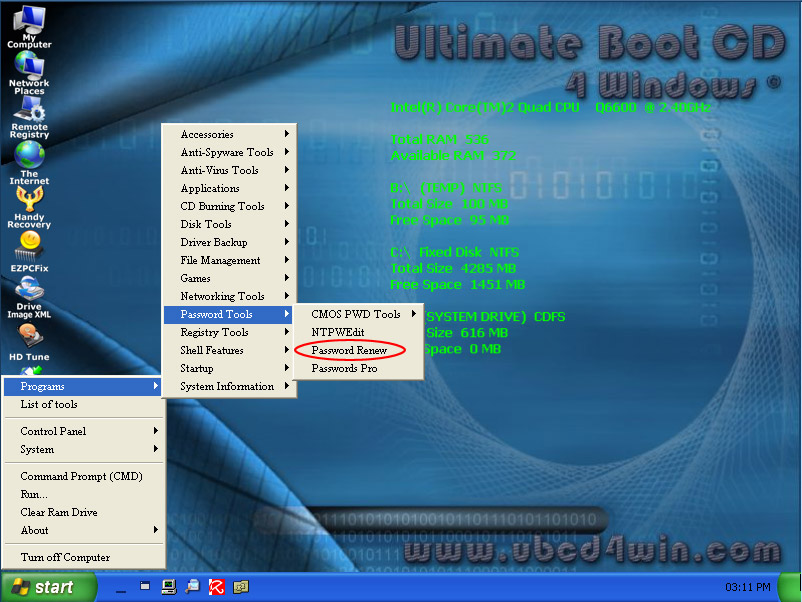
It will take a few minutes to load fully, but when it does you should see a Windows XP like interface. Once there, goto Start > Programs > Password Tools > Password Renew.
Once Password Renew is open, you need to tell it what Windows install you would like it to effect, so press “Select a Target” and choose the Windows installation (in most cases, its c:\windows).
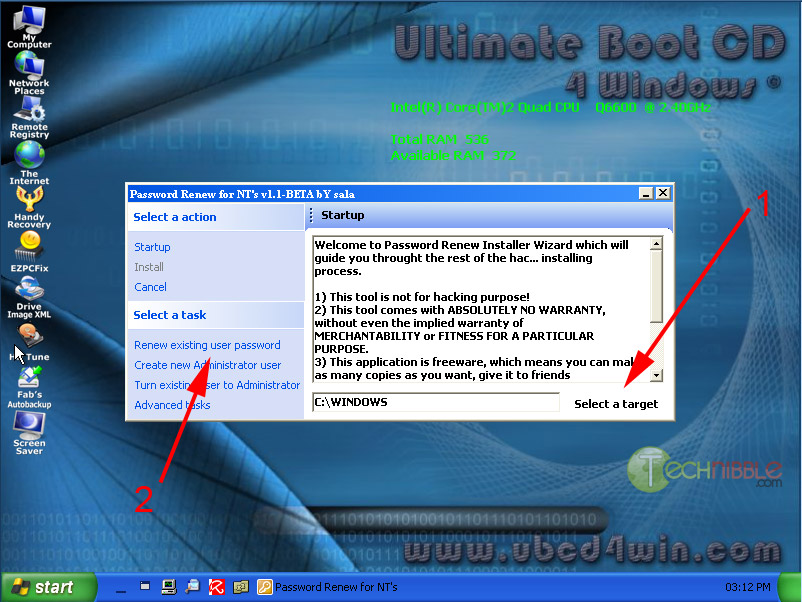
You can “Renew existing user password”, “create new Administrator user” or “Turn existing user to Administrator”. For this example, we’re just going to gain access to an existing user account so choose “Renew existing user password”.
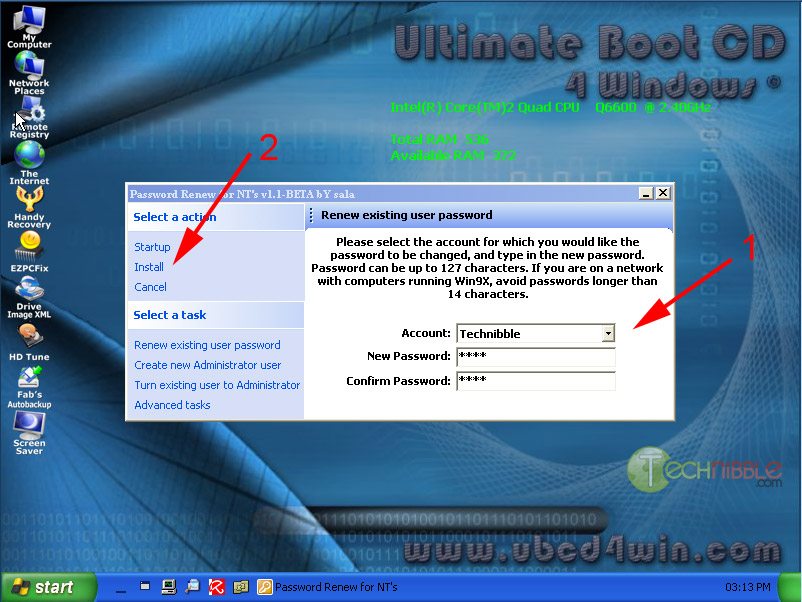
Choose the account you would like to change the password for and enter in the new password. Now press “Install” on the left hand side. Restart the computer, eject the boot CD and you should be able to use that user account.
Check them out here
Keep up the good work guys!
Computer Gal
Saturday, October 25, 2008
Computer Gal's Warning of Blaster like Attack!!
There is a serious blaster like worm attack rumored to be released and spread throughout the Internet soon.
It is believed that the threat is serious enough for every Windows user to install the new MS patch without hesitation. This is the first time in 1½ years that Microsoft has released an emergency fix outside of its monthly Patch Tuesday cycle. See Susan Bradley's article from Windows Secrets for more information. We'll bring you more information as soon as we have it.
You can find the patch links from Susan's article and below
Microsoft has posted several versions of the patch that apply to different operating systems:• Windows 2000 with Service Pack 4 patch download• Windows XP with Service Pack 2 or 3 patch download• Windows XP 64-bit Edition patch download• Windows Server 2003 with Service Pack 1 or 2 patch download• Windows Server 2003 64-bit Edition patch download• Windows Vista with or without Service Pack 1 patch download• Windows Vista 64-bit Edition with or without Service Pack 1 patch download• Windows Server 2008 32-bit Edition patch download• Windows Server 2008 64-bit Edition patch download
More information: Please read security bulletin MS08-067. For an excellent technical explanation of the vulnerability and possible mitigations, read TechNet's Oct. 23 description. (TechNet incorrectly refers to MS08-067 as "out-of-band," but the patch is simply out-of-cycle, because it wasn't released on Microsoft's usual Patch Tuesday monthly cycle.)
Please patch your systems immediately!
Computer Gal's LLC
www.computer-gal.com
It is believed that the threat is serious enough for every Windows user to install the new MS patch without hesitation. This is the first time in 1½ years that Microsoft has released an emergency fix outside of its monthly Patch Tuesday cycle. See Susan Bradley's article from Windows Secrets for more information. We'll bring you more information as soon as we have it.
You can find the patch links from Susan's article and below
Microsoft has posted several versions of the patch that apply to different operating systems:• Windows 2000 with Service Pack 4 patch download• Windows XP with Service Pack 2 or 3 patch download• Windows XP 64-bit Edition patch download• Windows Server 2003 with Service Pack 1 or 2 patch download• Windows Server 2003 64-bit Edition patch download• Windows Vista with or without Service Pack 1 patch download• Windows Vista 64-bit Edition with or without Service Pack 1 patch download• Windows Server 2008 32-bit Edition patch download• Windows Server 2008 64-bit Edition patch download
More information: Please read security bulletin MS08-067. For an excellent technical explanation of the vulnerability and possible mitigations, read TechNet's Oct. 23 description. (TechNet incorrectly refers to MS08-067 as "out-of-band," but the patch is simply out-of-cycle, because it wasn't released on Microsoft's usual Patch Tuesday monthly cycle.)
Please patch your systems immediately!
Computer Gal's LLC
www.computer-gal.com
Wednesday, October 22, 2008
How to Build A PC or Laptop

Have you ever wanted to know how to build a pc, well computer shopper has a great web page set up with all sorts of how to guides for building all types of different computers. They even have guides for building a laptop. Another great site for your favorites
Don't forget that computer gal's sells some great computer building / repair tool kits from $9.99 and up!
Computer Gal's LLC
Computer Gal's Moved From Brooksville Main St
Well due to all sorts of disasters we had to move out of our cute little shop on Main St. in Brooksville. There were some wiring problems, but the biggest issue was with our ATT Small Business DSL service. For some strange reason, one day our service was shut off. We were paid up to date, all was well, no reason, to just up and turn off a companies Internet service, especially a computer repair shop. I must have called 50-60 times, and each time got crazy responses as to why after 6 weeks we still had no Internet or phone service. One day they knew who we were and the next day couldn't even find our account. I will spare you the rest of the details as the attorneys are handling that for us, but we could take no more and decided we needed a building with a little newer and updated wiring.
Currently we are back at our Ridge Manor location and will probably stick with it for awhile, but will keep you posted.
Until later
Computer Gal
www.computer-gal.com
Currently we are back at our Ridge Manor location and will probably stick with it for awhile, but will keep you posted.
Until later
Computer Gal
www.computer-gal.com
Saturday, September 27, 2008
Bios Central A Must for your favorites
Remember the super utility cd that I am working on. Well, also on the cd you will find tons and tons of links and documents organized by category, such as computer repair, downloads, and many others. Included in the links section under computer repair sub category hardware (& software), you will find a link to www.bioscentral.com.
BIOS means Basic Input Output System. BIOS is actually firmware, the software that is programmed into a ROM (Read-Only Memory) chip built onto the motherboard of a computer. BIOS is what makes the system run an initial Power-On Self-Test of the computer, initialize circuits, load the boot program from the boot disk, and then handle low-level I/O to peripheral controllers such as keyboard and display.
While working on a computer you will hear a series of beep codes, that you must decipher to determine what is wrong with the computer. It is kinda like morse code for the repair technician that the computer beeps out that tells us why the computer is not booting correctly.
Some motherboard also list post codes with different values such as numeric codes of
10 for CMOS ROM shutdown byte testedsignify.
There are also different key combinations that you must hit upon boot to enter the bios to make changes to the motherboard when upgrading or when making any changes to the system. An example is the f2 key for most dells. If you hit the f2 repeatedly while booting, you will then enter the bios setup.
In the document section you will have all the codes to enter the bios of all manufactures, the beep codes and post codes.
In the meantime, check out www.bioscentral.com and make a note to yourself that Computer Gal's super cd is going to be a must have for both novice and computer pros!
Until Later
Computer Gal
www.computer-gal.com
BIOS means Basic Input Output System. BIOS is actually firmware, the software that is programmed into a ROM (Read-Only Memory) chip built onto the motherboard of a computer. BIOS is what makes the system run an initial Power-On Self-Test of the computer, initialize circuits, load the boot program from the boot disk, and then handle low-level I/O to peripheral controllers such as keyboard and display.
While working on a computer you will hear a series of beep codes, that you must decipher to determine what is wrong with the computer. It is kinda like morse code for the repair technician that the computer beeps out that tells us why the computer is not booting correctly.
Some motherboard also list post codes with different values such as numeric codes of
10 for CMOS ROM shutdown byte testedsignify.
There are also different key combinations that you must hit upon boot to enter the bios to make changes to the motherboard when upgrading or when making any changes to the system. An example is the f2 key for most dells. If you hit the f2 repeatedly while booting, you will then enter the bios setup.
In the document section you will have all the codes to enter the bios of all manufactures, the beep codes and post codes.
In the meantime, check out www.bioscentral.com and make a note to yourself that Computer Gal's super cd is going to be a must have for both novice and computer pros!
Until Later
Computer Gal
www.computer-gal.com
Sunday, September 21, 2008
Super Utility Disk ~ Game Key Revealer

Computer Gal's is working on a Super Utility Cd that will be for sale soon. This cd will include hundreds of useful programs, applications, training, and much more. The cd will hold hundreds of useful tools that has taken me over a year to download and put together. The CD will sell for around $20.00 and will be worth every penny of it, due to the amount of software, applications, tools and time that I have in to it.
I will also have a index of each tool with a summary and link to more informaiton so you will know which tool to use and when. I will also include a emergency boot cd to boot windows so you may access your data and possibly evem repair your hard disk!
I will start listing some of the tools here, so you will get an idea of what is inlcuded in the super cd bundle!
This tool is a game key finder, for when you have lost the key to one of your favorite computer gmaes.
Game Key Revealer is a small, portable, freeware application designed to list the license/cd keys for thegames currently installed on a computer. To use, just click the “Find Games” button and it will list the license keys. You then have an option to save these keys to a text file, a word document or print it directly to from the application to your printer. This is a handy tool to run before a format because clients tend to lose the original CD covers, boxes or manuals that the license keys came on.
Read on to see a full list of the games it can reveal license keys for.
Read on to see a full list of the games it can reveal license keys for.
Currently Supported Games:
10tacle Studios- GT Legends- GTR 2
Activision- Call of Duty (all series)-
10tacle Studios- GT Legends- GTR 2
Activision- Call of Duty (all series)-
Star Trek: Starfleet Command III- Star Trek: Elite Force II-
Tony Hawk’s Underground 2
ATARI- Act of War (all series)-
ATARI- Act of War (all series)-
Terminator 3: War of the Machines- And some other games
AxySoft- Almost all games
Crytek- Crysis- Crysis Warhead- FarCry
Electronic Arts- Battlefield 1942 (all series)- Battlefield 2 (all series)- Battlefield 2142 (all series)- Black & White (all series)- Black & White 2 (all series)-
AxySoft- Almost all games
Crytek- Crysis- Crysis Warhead- FarCry
Electronic Arts- Battlefield 1942 (all series)- Battlefield 2 (all series)- Battlefield 2142 (all series)- Black & White (all series)- Black & White 2 (all series)-
Command and Conquer (all series)- Command and Conquer 3 (all series)-
Cricket (all series)- F1 (all series)- FIFA (all series)- FIFA Manager (all series)- FIFA World Cup (all series)-
Fussball Manager (all series)-
Harry Potter (all series)-
NFL (all series)-
Medal of Honor (all series)-
MVP Baseball (all series)-
Nascar (all series)-
NBA Live (all series)-
Need for Speed (all series)-
NHL (all series)- Rugby (all series)-
Shogun: Total War (all series)-
SimCity (all series)-
The Lord of the Rings (all series)-
The Sims (all series)- The Sims 2 (all series)-
Tiger Woods PGA TOUR (all series)-
Total Club Manager (all series)-
UEFA Champions League (all series)- UEFA Euro (all series)- And all other games
Epic Games- Unreal Tournament (all series)
Eugen Systems- Act of War (all series)- The Gladiators
Funatics Development-
Epic Games- Unreal Tournament (all series)
Eugen Systems- Act of War (all series)- The Gladiators
Funatics Development-
The Settlers II - 10th Anniversary- Zanzarah
GameHouse- Almost all games
Iron Lore- Titan Quest (all series)
JoWooD- Industry Giant 2-
GameHouse- Almost all games
Iron Lore- Titan Quest (all series)
JoWooD- Industry Giant 2-
The Nations- And some other games
KONAMI- Pro Evolution Soccer (all series)-
KONAMI- Pro Evolution Soccer (all series)-
Winning Eleven (all series)
Lionhead Studios- The Movies- And some other games
LucasArts- Star Wars Battlefront (all series
Lionhead Studios- The Movies- And some other games
LucasArts- Star Wars Battlefront (all series
Star Wars Empire at War (all series)- Star Wars Republic Commando
Oberon Media- Almost all games
Phenomic- Spell Force (all series)
Pi Eye Games- Almost all games
PopCap Games- Almost all games
SEGA- Medieval II: Total War- Rome: Total War
Sierra/Valve- Caesar (all series)- Counter-Strike- Gunman Chronicles- Half-Life- TimeShift- World In Conflict- And some other games
Techland- Call of Juarez- Chrome- GTI Racing- Xpand Rally (all series)
THQ- Company of Heroes- Company of Heroes: Opposing Fronts- Dawn of War (all series)- Forged Alliance- Frontlines: Fuel of War- MotoGP 2007- S.T.A.L.K.E.R. - Shadow of Chernobyl- Supreme Commander- Zanzarah
Ubisoft- FarCry-
Oberon Media- Almost all games
Phenomic- Spell Force (all series)
Pi Eye Games- Almost all games
PopCap Games- Almost all games
SEGA- Medieval II: Total War- Rome: Total War
Sierra/Valve- Caesar (all series)- Counter-Strike- Gunman Chronicles- Half-Life- TimeShift- World In Conflict- And some other games
Techland- Call of Juarez- Chrome- GTI Racing- Xpand Rally (all series)
THQ- Company of Heroes- Company of Heroes: Opposing Fronts- Dawn of War (all series)- Forged Alliance- Frontlines: Fuel of War- MotoGP 2007- S.T.A.L.K.E.R. - Shadow of Chernobyl- Supreme Commander- Zanzarah
Ubisoft- FarCry-
Peter Jackson’s King Kong-
Prince of Persia: The Two Thr, with ones-
Rainbow Six III RavenShield- Silent Hunter III- Splinter Cell: Chaos Theory- Splinter Cell: Pandora Tomorrow- The Settlers II - 10th Anniversary- And some other games
And more
And more
Look for more post coming up of the variety of utilities that will be availble for you on this cd.
Each tool by itself is normally $5.00 downloaded for you and shipped for free, if you just need one, and need it now, just let me knowand I will prepare you the download with the documenation and ship it right out.
thanks again, and unti later
Computer Gal
support@computer-gal.com
www.computer-gal.com
Wednesday, September 17, 2008
Microsoft Business Productivity Online Suite

What is Microsoft Business Productivity Online Suite? Microsoft is providing us a new way to engage and serve customers. With Business Productivity Online Suite (BPOS), which is comprised of Microsoft Exchange Online, Microsoft Office Communications Online, Microsoft Office Live Meeting, and Microsoft SharePoint Online. This new serive is subscription based, so that small and large busineesses alike and utilize a great number of Microsoft products for a small montly fee. Computer Gal's is also offering a package which includes all the above and ongoing management and support for the BPOS package plus new services and features designed around such Microsoft online offerings. Our Microsoft clients must select Computer Gal's LLC as their partner of Record (POR) when ordering the service
Microsoft offers the following online services at this time individually or in the business bundle.
Customers can either purchase the Business Productivity
Online Suite (BPOS), or the individual BPOS products.
Microsoft Business Productivity Online Services (BPOS) is
comprised of:
Microsoft E • xchange Online
• Microsoft Office Communications Online
• Microsoft Office Live Meeting
• Microsoft SharePoint Online
• Microsoft Exchange Online Filtering (not available as
a standalone online services product)
The customer orders are placed online, at the Microsoft Online Customer Portal (MOCP), http://www.microsoftonline.com/. During the order process, a customer is asked to
designate a partner as their partner of record. The partner selected is associated with the customer order, as POR, and will remain so, until a customer elects to make a change.
At launch, the customer subscription term length for all
services is 12 months. There are a couple exceptions for the
following scenarios:
When additional seats • are added to an existing
service for the same subscription, or
• For the purchase of extra storage for an existing
service
These additional purchases will be co-terminus with the
original service.
This new service provided by Microsoft is a win/win program, allowing businesses to expand and grow without the high cost associated with adding the software and technology staff to help maintain and support the product. Computer Gal's currently offers a package with the above that cost only a fraction of what one IT person would cost your organization and allows you to take advantage of the service and a tech all wrapped up into one.
Please email us with BPOS in the subject line for more information.
Until Later
Computer GAl
Tuesday, August 26, 2008
Virus, Trojans, and Malware Oh My

Remember Dorothy of the Wizard of the Oz!!!!!
According to one of the columnist at PC World, Viruses have been on the heavy this week. Apparently dozens of various emails have been sent out with virus infected attachments or links to a backdoor Trojan horse. The total peaked at close to 11 million messages per hour early Thursday, but remained at high volumes throughout the day Friday.
There are several different variants being sent out. One has a authentic looking link to CNN that is sure to cause havic on your pc if clicked, more information can be found here http://www.pcworld.com/article/149642/article.html
The second apparently is a email with a subject of a current news related headline to entice you into clicking on the link for more and then stating the adobe flash player is required to view the video clip of the story. The player is then stuck in a loop, only to cause more pop ups and infections when you click on cancel.
The third method is links to legitimate sites that had been compromised, meaning the hacker had infected real legitimate web sites with different variations so that the user could become infected by browsing the site. Officials had found over one thousand legitimate web sites that had become temples of doom for the consumer.
The fourth looks as though it was written by second graders stating that a federal express package has not been delivered and asked you to click on a trojan horse infected invoice to be printed.
The worst of the bunch is the adobe flash updater, which as mentioned above requires you to click on the link to update your flash player in order to watch the bogus news video.
It is said a unprotected computer will last about 10 seconds on the internet before becoming infected with some sort of virus, trojan or malware.
Infections such as these can often lead to identity theft, data loss and even hardware damage when the CPU is raised to 100%.
Ok commercial time......
If you live in the central Florida area, Computer Gal's located at 500 S. Main St, in downtown Brooksville can repair most virus related issues for just $40.00. All viruses, trojans, and mallware are removed and prevention is installed. I usually scan a computer for three days with several different products to ensure my customers are not re-infected after leaving my shop. We are now running a special for a complete pc tune up that includes the above and a complete pc check up, which includes updating all your drivers, and Microsoft updates for just $59.95 Here is the link/info to our shop, so please do yourself a favor and drop off your computer today.
According to one of the columnist at PC World, Viruses have been on the heavy this week. Apparently dozens of various emails have been sent out with virus infected attachments or links to a backdoor Trojan horse. The total peaked at close to 11 million messages per hour early Thursday, but remained at high volumes throughout the day Friday.
There are several different variants being sent out. One has a authentic looking link to CNN that is sure to cause havic on your pc if clicked, more information can be found here http://www.pcworld.com/article/149642/article.html
The second apparently is a email with a subject of a current news related headline to entice you into clicking on the link for more and then stating the adobe flash player is required to view the video clip of the story. The player is then stuck in a loop, only to cause more pop ups and infections when you click on cancel.
The third method is links to legitimate sites that had been compromised, meaning the hacker had infected real legitimate web sites with different variations so that the user could become infected by browsing the site. Officials had found over one thousand legitimate web sites that had become temples of doom for the consumer.
The fourth looks as though it was written by second graders stating that a federal express package has not been delivered and asked you to click on a trojan horse infected invoice to be printed.
The worst of the bunch is the adobe flash updater, which as mentioned above requires you to click on the link to update your flash player in order to watch the bogus news video.
It is said a unprotected computer will last about 10 seconds on the internet before becoming infected with some sort of virus, trojan or malware.
Infections such as these can often lead to identity theft, data loss and even hardware damage when the CPU is raised to 100%.
Ok commercial time......
If you live in the central Florida area, Computer Gal's located at 500 S. Main St, in downtown Brooksville can repair most virus related issues for just $40.00. All viruses, trojans, and mallware are removed and prevention is installed. I usually scan a computer for three days with several different products to ensure my customers are not re-infected after leaving my shop. We are now running a special for a complete pc tune up that includes the above and a complete pc check up, which includes updating all your drivers, and Microsoft updates for just $59.95 Here is the link/info to our shop, so please do yourself a favor and drop off your computer today.
500 S. Main St.
Brooksville, FL. 34601
(352) 505-2467
ok, now back to our regularly scheduled er huh article.
For more information on the current outbreak please check out PC World's link and bookmark our blog for the latest technology and security news and updates.
ok, now back to our regularly scheduled er huh article.
For more information on the current outbreak please check out PC World's link and bookmark our blog for the latest technology and security news and updates.
Until Later
Computer Gal
Subscribe to:
Posts (Atom)